RFID Printing and Encoding Standards: What Manufacturers Need to Decide

- Choose the business identity and numbering standard before selecting memory size or configuring the printer.
- Treat RFID printing as a data workflow: the printed information, encoded identity, serialization source and system-of-record relationship should agree.
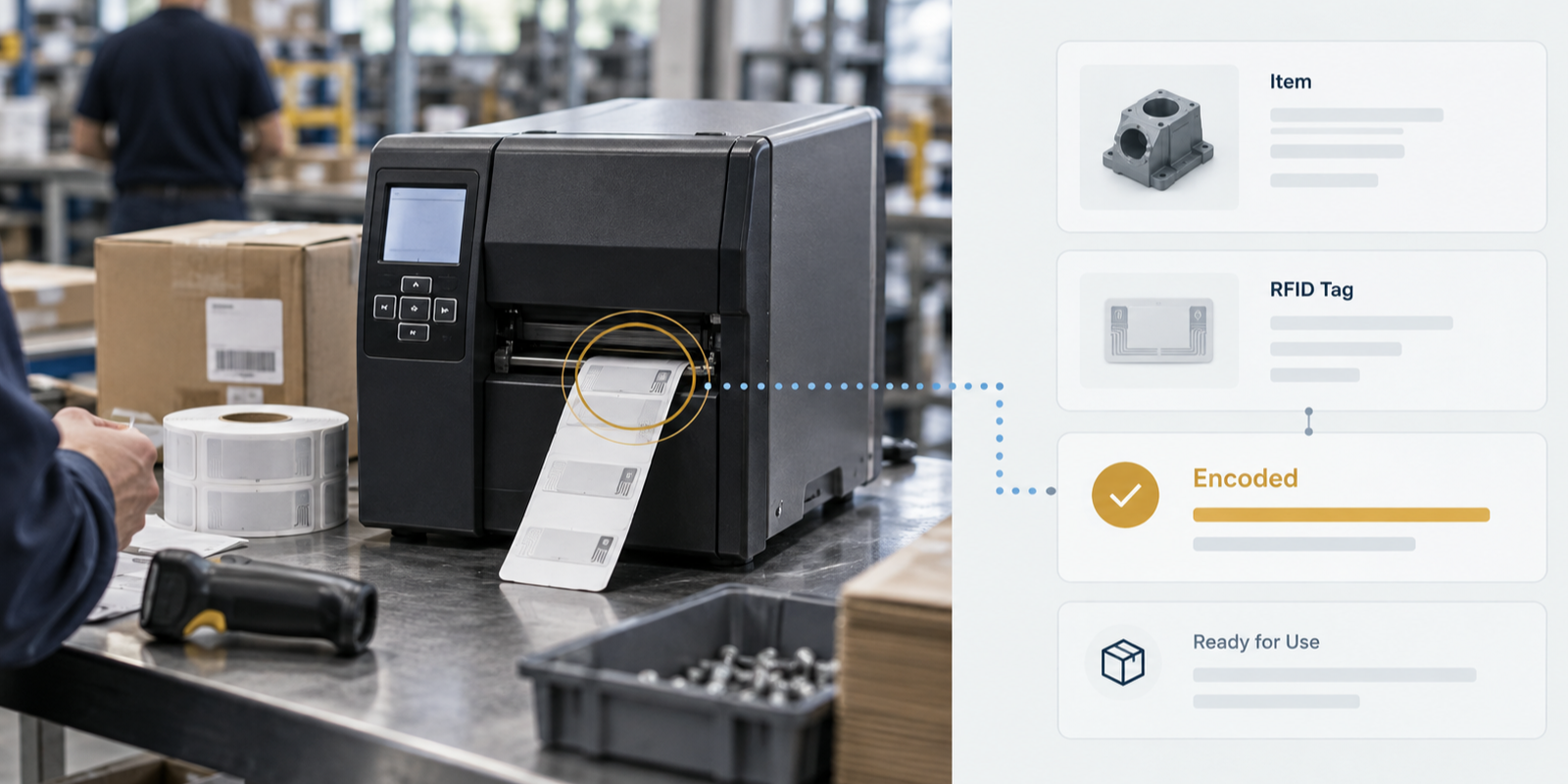
- Validate the actual media and object, then encode and verify each tag in the same production step so failures are caught before labels leave the printer.
RFID printing is one of those parts of a deployment that looks straightforward until the first production roll reaches the printer. A label has to look right, encode the right identity, survive the object it is attached to, and still be readable by equipment that may belong to someone else. If any one of those pieces is wrong, the mistake is multiplied every time another label is printed.
That is why the important printing decisions happen before the printer starts. The team needs to know what the tag will identify, which numbering system owns that identity, how serialization will work, what memory will actually be written, and how each finished label will be verified. Only after those questions are settled does printer setup become the easy part.
This guide focuses on those decisions from a manufacturing point of view. It is written with the same practical assumptions we use when helping customers select RFID printers and media, integrate encoding with existing systems, and introduce RFID into a production process without creating a second identity system that has to be reconciled later.
Start with the identity, not the printer
The first question is not which printer to buy. It is what the tag is supposed to identify. A finished retail product, a reusable tote, a production traveler, a tool and an aerospace component may all use passive UHF RFID, but they do not necessarily use the same identifier or data standard.
That distinction matters because the tag should normally carry a compact, durable identity rather than the complete business record. The ERP, MES, WMS or asset system should continue to own the richer information: description, lot, status, work order, calibration record, owner, location history and whatever else the process requires. Our RFID integration guide explains why that separation makes the architecture much easier to maintain.
For a retailer-mandated program, the identity may already be prescribed. For an internal manufacturing application, the organization has more freedom, but that does not mean it should invent an arbitrary encoding. A standard identifier is easier to validate, easier to exchange and much less likely to become a future integration problem.
There are several standards layers, and they solve different problems
One reason RFID standards can feel confusing is that several standards are involved at the same time. The air-interface standard governs how the reader and tag communicate. The tag-data standard governs how identifiers are represented in tag memory. Business standards govern what those identifiers mean inside a supply chain or enterprise.
For passive UHF systems, the widely used air interface is EPC UHF Gen2, standardized internationally as ISO/IEC 18000-63. That tells conforming readers and tags how to communicate over the radio. It does not, by itself, tell you what business identifier to put on the tag.
Within the GS1 ecosystem, the EPC Tag Data Standard defines the Electronic Product Code and how GS1 identities are represented in Gen2 tag memory. GS1 currently lists TDS 2.3.0 as the current version. The standard includes familiar schemes such as SGTIN for serialized trade items, along with other EPC schemes for assets, locations, logistics units and documents.
ISO-based numbering systems also exist. The tag's protocol-control information includes a toggle bit that distinguishes the GS1 and ISO numbering approaches. RAIN Alliance guidance describes the toggle as 0 for GS1 numbering and 1 for ISO numbering, with ISO applications also using an Application Family Identifier to indicate the applicable numbering system or application family. The practical point is simple: the encoding has to declare what kind of identity follows so other compliant systems know how to interpret it.
Do not design a proprietary encoding just because you can
A closed-loop application makes proprietary encoding tempting. If the only readers belong to your company and the only software is yours, it may seem harmless to pack a custom serial number into memory in whatever format is convenient. That works until a supplier, customer, acquisition, new ERP or second facility needs to understand the same population of tags.
TSC makes this point well in its guidance on standards-based RFID printing and encoding: proprietary schemes were manageable when RFID systems were vertically isolated, but they become a problem as tagged goods cross organizational boundaries. We agree with that framing. If an established standard can represent the identity you need, using it is almost always easier than becoming the only organization that understands your own tags.
This does not mean every internal asset needs a retail-style SGTIN. It means the numbering decision should be deliberate and documented. The standard should fit the object and the process, not the marketing label on the technology.
Memory size should follow the identity you actually need
A common mistake is to start with a memory size and then ask what can be squeezed into it. The better direction is the reverse. Define the identity and serialization requirements first, then choose a tag IC with enough memory for that encoding and any other information the application genuinely requires.
GS1's current guidance notes that simple RAIN RFID tags often carry a 96-bit or 128-bit identifier, while specialized high-memory tags can carry substantially more information. It also distinguishes the EPC memory bank, where the serialized business identifier is normally stored, from optional user memory. More memory is not automatically better. If the complete record already lives in enterprise software, storing another copy of it on the tag creates a synchronization problem.
Even within one identity type, encoding length matters. For example, GS1's SGTIN-96 is compact but places restrictions on the serial number, while longer or newer encodings can represent a broader set of values. GS1's serialization guidance is worth reviewing before a numbering scheme is frozen because changing serialization rules after production has begun can mean re-encoding or replacing an entire tag population.
The printed label and the RFID inlay have to be designed together
An RFID label is not a normal barcode label with an invisible feature added underneath. The chip and antenna have physical thickness, and that can affect print quality. TSC calls out two features in particular: the chip bump and the antenna ridge.
The chip creates a small raised area in the label. Dense graphics, small text or solid print directly over that location can print differently because the media is no longer perfectly flat under the printhead. The antenna creates a broader ridge around the inlay that can produce the same problem, although usually more gradually. If the artwork is flexible, the simplest approach is to keep critical graphics, small type and dense barcodes away from those areas.
The physical tag construction also has to match the object. A conventional paper RFID label may work well on corrugated packaging but perform poorly when placed directly on metal or near liquids. On-metal constructions use spacing and antenna design to tolerate that environment. Our guide to RFID tag selection covers those object-level choices in more detail.
Serialization is where the RFID label becomes a business record
Every label may look identical to a person and still need a unique electronic identity. That makes serialization one of the most important design decisions in the printing workflow. The system has to know which serial number should be printed, which value should be encoded, and which business object that identity belongs to.
The tag's TID, or Tag Identifier, is not a substitute for that business identity. TID identifies information about the tag IC itself and is generally manufacturer-programmed. The EPC or UII is the application-level identity that the organization controls. Keeping those concepts separate is useful during troubleshooting because the TID can help identify a physical tag even if the business identifier was encoded incorrectly.
For production printing, serialization should ideally come from the same authoritative source that owns the item or transaction. If the ERP creates the serial number, the print-and-encode workflow should consume that number rather than generating an unrelated identifier locally. If an edge application generates the serials, the allocation rules and handoff back to the system of record need to be explicit. The important thing is that two systems are not independently creating identities for the same physical item.
Encode and verify in the same workflow
A successful print job does not prove that the RFID portion of the label is usable. A production printer with an RFID encoder should write the tag and verify the result before the label leaves the printer. If the write fails, the workflow needs to reject that label and produce a replacement using the intended identity rather than silently incrementing to the next serial number.
This is where industrial RFID printers provide more value than simply bolting an external encoder onto a labeling process. The printer knows which physical label is under the encoder, which data was sent for that label and whether the tag responded correctly. The exact reject and verification behavior varies by printer and configuration, so it should be tested with the actual media before production.
Short-pitch labels deserve particular attention because several inlays can be physically close to the encoding antenna at the same time. Printer calibration and antenna design have to isolate the intended tag. A system that writes the correct data to the wrong adjacent label is worse than a visible print defect because the failure may not be discovered until the item reaches a downstream reader.
Locking and security should match the consequence of a bad rewrite
Gen2 tags support controls such as access passwords, memory locking and a kill command. Later Gen2 features also include commands such as UNTRACEABLE and AUTHENTICATE. These controls are useful, but they should be applied according to the risk of the application rather than turned on simply because the chip supports them.
If a tag will never need to be rewritten after commissioning, locking the relevant memory can reduce the chance of accidental or unauthorized changes. If the item is reused and the identifier is expected to change, permanent locking would be a poor choice. Kill commands can be appropriate where a tag must be permanently disabled, but they are irreversible and should be governed accordingly.
The larger security architecture still belongs in software and process. An RFID tag can help establish identity, but a readable EPC by itself should not be treated as proof of authenticity, ownership or process completion. Those conclusions depend on the surrounding system, permissions, event history and, where necessary, additional authentication mechanisms.
Retail compliance and internal manufacturing are different printing problems
Retail RFID programs often arrive with a defined label format, data standard and serialization requirement. The supplier's job is to generate the correct tag and printed label without disrupting the production workflow. Internal manufacturing programs are different because the manufacturer is often defining the identity model itself.
Our work with Louis Garneau is a good example of the first case. The company needed to meet retailer RFID requirements across a distributed manufacturing operation without rebuilding its ERP around a new labeling process. FactorySense implemented the print-and-encode layer at the edge so the existing workflow could continue while the required RFID identity was added to the finished label.
That pattern is useful beyond retail. The best RFID printing workflow is often the one operators barely notice. The business system already knows what is being produced, the print job already exists, and the RFID layer adds a standards-based identity and verification step without asking the operator to re-enter the same information somewhere else.
What should be decided before the first production roll
Before a label format is released, the project team should be able to answer a short list of questions without referring to the printer manual. What physical object is the label identifying? Which system owns that identity? Is the numbering scheme GS1, ISO or another documented standard? How are serial numbers allocated and protected from duplication? Which memory bank is being written? Does the chosen inlay have enough memory? Will the tag ever need to be rewritten? What happens when encoding fails?
The physical questions matter just as much. Has the inlay been tested on the actual object? Is the chip bump under a critical barcode or graphic? Can the printer isolate one tag at the media pitch being used? Does the adhesive and tag construction survive the production environment? Can a downstream reader decode the finished labels using the same interpretation the printing system expects?
Those questions are best answered during the same pre-installation and validation process used for the rest of an RFID deployment. Printing should not be treated as a peripheral task after the reader infrastructure is already designed. It is the point where the physical object receives the identity every downstream system will depend on.
The goal is boring, repeatable output
A good RFID printing process should eventually be uneventful. An operator sends a label job, the correct business identity is serialized, the printer encodes and verifies the intended tag, the human-readable information matches the electronic identity, and the result can be understood by the systems that need it downstream.
Getting to that point requires a few decisions up front, but none of them are mysterious. Use a standards-based identity, let the business system remain authoritative, select media for the actual object, design around the physical inlay, verify every write, and avoid security settings that conflict with the tag's intended lifecycle. Once those pieces are settled, RFID printing becomes part of the normal production process instead of a specialty operation sitting beside it.
Sources and further reading
What standard should manufacturers use to encode RFID tags?
It depends on the application. GS1 EPC standards are common where GS1 business identifiers are used, while ISO-based numbering systems support other applications. The important point is to choose a documented standard that fits the object and process rather than inventing an undocumented proprietary encoding.
What is the difference between TID and EPC memory?
TID contains manufacturer-programmed information about the RFID tag or chip. EPC or UII memory normally carries the application-level identity associated with the item being tracked. They serve different purposes and should not be treated as interchangeable serial numbers.
Why should RFID labels be verified immediately after encoding?
Verification confirms that the intended tag received the intended data before the label leaves the printer. This catches failed writes and helps prevent a physical label from entering production with an electronic identity that does not match the print job.
Schedule a complementary working session with an RFID professional to discuss your floor or yard, your systems of record, and where the visibility gap between them is costing you.
Book a session